 Inviteroll
Evite Alternatives: 5 Online Invitation Tools Compared (2026)
What each tool costs, what guests have to do to reply, and which one fits weddings, birthdays and casual parties
Updated November 2, 2026 · 6 min read

Short answer: if you want a free invitation for a casual party, Partiful is the simplest choice; Paperless Post and Greenvelope are the premium picks for formal, design-led weddings; Apple Invites suits hosts whose guests mostly use iPhones; and Inviteroll is built for hosts who send invitations on WhatsApp, want RSVPs and guest photos in one place, and prefer a single payment per event over per-guest pricing.
Below we compare the five most common Evite alternatives on price, ads, guest limits, how guests reply and photo sharing. Prices were checked in November 2026 from each company's pricing pages or recent published price lists — they change often, so confirm on the provider's site before you buy.
Why people look for an Evite alternative
Evite has been the default online invitation service for years, and its free plan is generous on guest numbers. The most common complaints are about what guests see and what it costs to change that: free invitations show third-party ads and gift suggestions, and removing ads or adding features such as envelopes triggers Premium pricing based on the size of your guest list. A host gallery for photos is also part of Premium.
So the questions most hosts ask are: Can my guests reply without ads, apps or accounts? What will a full guest list cost? Can I collect photos from the event in the same place? The tools below answer those differently.
Paperless Post: best for formal designs
Paperless Post is known for its designer stationery, animated envelopes and polished cards, which makes it popular for formal weddings and corporate events. Pricing is per recipient: each design costs a number of Coins per guest, and a flat 200 Coins adds premium features such as a photo gallery and custom URL. Frequent senders can choose an annual Pro subscription priced by yearly guest count, starting at $250 for 250 guests (Paperless Post pricing).
Choose it if design is the priority and you send mostly by email. The per-recipient model adds up for large guest lists.
Partiful: best free option for casual parties
Partiful is a free, social-style party invite app. You share one link anywhere; guests reply in the browser with their phone number, which lets the host send text updates to everyone and gives guests automatic reminders. After the event, guests can add photos to the event page (Partiful help center).
Choose it for birthdays and house parties with friends. The casual, meme-friendly style fits less well with formal weddings, and asking guests for a phone number to RSVP is not to everyone's taste.
Apple Invites: best if your guests use iPhones
Apple Invites is Apple's own invitation app for iPhone and the web. Creating invitations requires an iCloud+ subscription; guests can reply from the app or on the web without an Apple account. Events can include a shared album in Apple Photos and a playlist in Apple Music (App Store listing).
Choose it if you already pay for iCloud+ and most guests have Apple devices. Guests on Android can reply, but the shared album and playlist work best inside Apple's ecosystem.
Greenvelope: best for printed-look wedding suites
Greenvelope recreates traditional stationery — envelope, liner, stamp and enclosure cards — in digital form, and many wedding planners use it. Instead of per-guest pricing it charges a one-time fee per mailing by guest tier: $19 for up to 20 guests, $99 for up to 100 and $249 for up to 250, with optional annual memberships (Greenvelope pricing).
Choose it for a classic wedding invitation suite delivered by email. It is less suited to quick, casual events.
Inviteroll: best for WhatsApp invitations with RSVP and guest photos
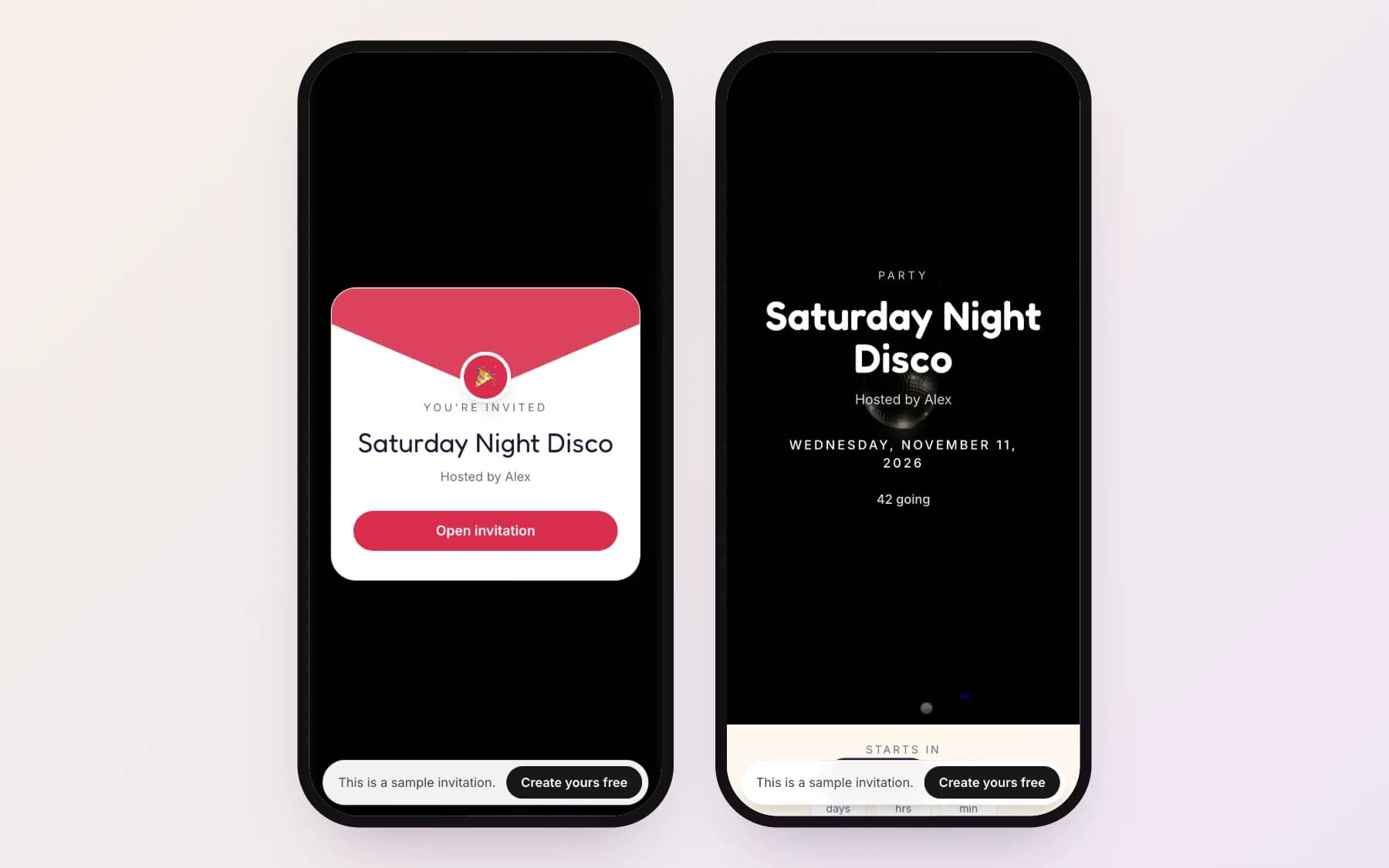
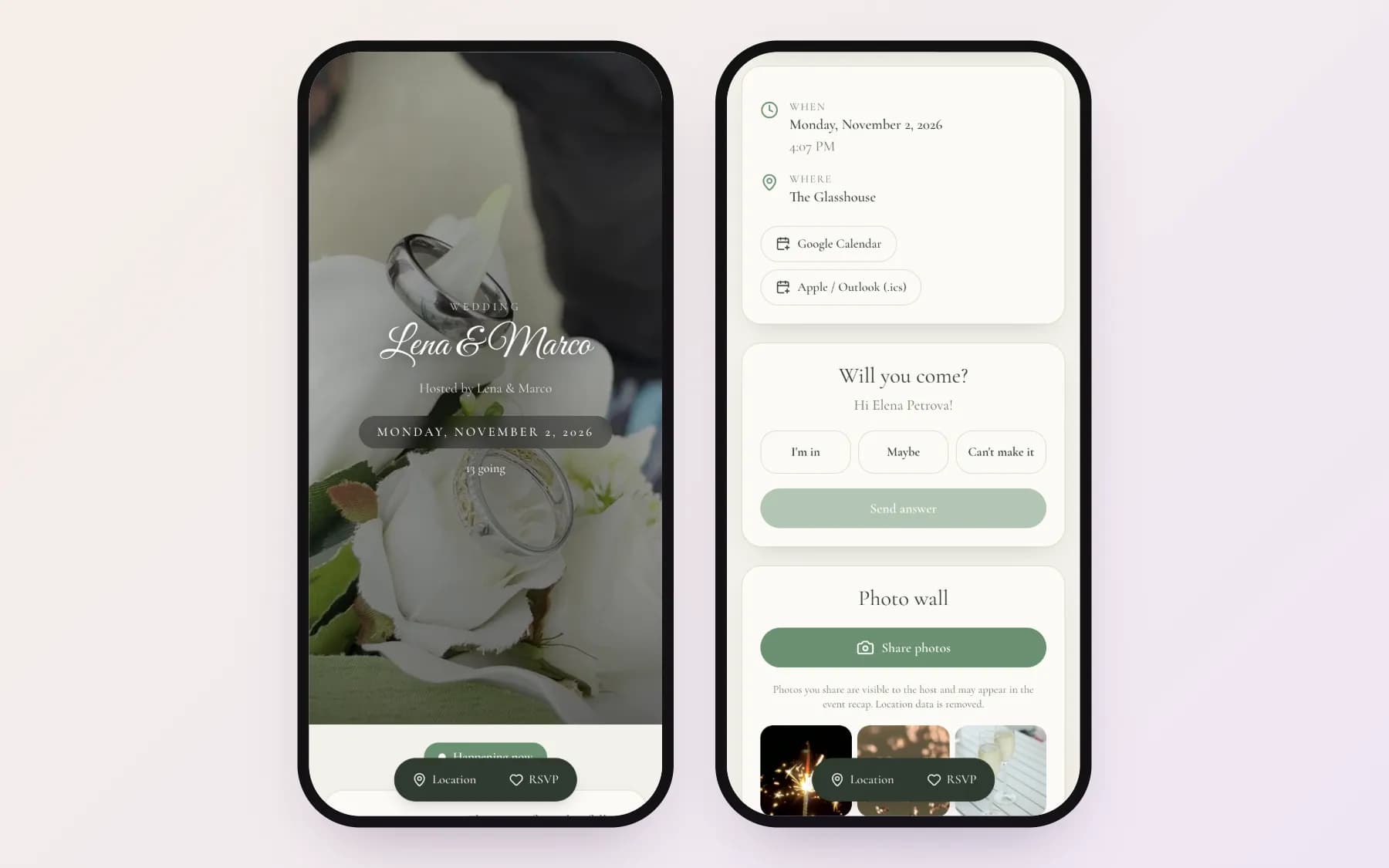
Inviteroll is the tool we make, so here is what it does and does not do. It is built for hosts who send invitations by message — especially on WhatsApp. Each guest gets a personal link: the invitation opens from an envelope, the RSVP section greets them by name, and they answer Going, Maybe or Not going with the number of people and a note, in the browser, without an app or an account. You can also turn on an open link for group chats. During the event guests add photos to a shared wall from the same link or a printable QR code, and afterwards you can turn the best ones into a 1080×1920 story or video. There are no ads on invitations, and location data is removed from every photo.
Your first event is free with up to 20 guests and 5 photos (with a small watermark). Plus is a single payment for that event — USD 10.99 in the US, with local prices in other currencies — for up to 300 guests and 300 photos, no watermark, nothing that renews. An optional Pro subscription unlocks Plus on all your events. What Inviteroll does not do: it does not send invitations by email for you, it has no automatic reminders to guests and no RSVP-by date — you send links and reminders yourself from your phone. Open a sample party invitation to see what guests get.
How to choose
Start from how you will send the invitation and what you need back. If you will send by email and design matters most, look at Paperless Post or Greenvelope. If everyone is in a group chat and it is a casual party, Partiful or an open Inviteroll link is quickest. If you want each guest's answer matched to their name, a headcount you can trust and the guests' photos afterwards, a personal-link tool such as Inviteroll fits best.
For weddings specifically, see our guides to making a digital wedding invitation and collecting guest photos with a QR code. For parties, our birthday invitation wording has texts you can copy.
| Tool | Price model | Ads for guests | Guests reply with | Guest photos | Best for |
|---|---|---|---|---|---|
| Evite | Free up to 750 guests; Premium about $17.99–$99.99 per event by guest count | Yes on free invitations | Link, email or text; no account needed | Host gallery on Premium | Classic parties, large free lists |
| Paperless Post | Coins per recipient; Pro from $250/year (250 guests) | No | Email or shareable link | Photo gallery with premium features | Formal, design-led events |
| Partiful | Free | Not stated | Browser, with phone number | Guests add photos to the event page | Casual parties with friends |
| Apple Invites | Requires iCloud+ subscription | No | App or web; no Apple account needed | Shared album in Apple Photos | iPhone-heavy guest lists |
| Greenvelope | One-time per mailing: $19 (20 guests) to $249 (250 guests) | No | Email or link | Not a focus | Traditional wedding suites |
| Inviteroll | Free: 1 event, 20 guests; Plus USD 10.99 one-time per event (300 guests) | No | Personal or open link in the browser; no account | Shared photo wall + QR code, recap story | WhatsApp invitations, weddings, birthdays |
How to switch from Evite to another invitation tool
- 1
List what you need
How you will send (email, WhatsApp, group chat), how many guests, whether you need photos afterwards, and your budget.
- 2
Check the price for your guest count
Per-recipient, per-tier and per-event pricing give very different totals for 30 versus 200 guests.
- 3
Open a sample invitation as a guest
Look at what guests see: ads, sign-up prompts, how many taps it takes to reply.
- 4
Recreate your event
Copy the title, date, venue and message into the new tool and import or paste your guest list.
- 5
Send a test to yourself
Check the link preview in your messaging app, reply as a guest and confirm the answer appears on your list.
Try Inviteroll for your next event
No ads, no app for guests, RSVPs and photos in one place. Your first event is free.
Create your invitationFrequently asked questions
Is there a free alternative to Evite without ads?
Yes. Inviteroll's free plan (one event, up to 20 guests, 5 photos) shows no ads to guests. Partiful is free to use, and Apple Invites has no ads but requires an iCloud+ subscription to create invitations.
How much does Evite Premium cost?
Evite Premium is a one-time charge per event priced by guest count. Published price lists from October 2026 show about $17.99 for up to 12 guests up to $99.99 for up to 750 guests. Check Evite's site for current prices.
Which Evite alternative is best for weddings?
For a traditional, design-led suite sent by email, Paperless Post or Greenvelope. For invitations sent on WhatsApp with personal RSVP links and a shared photo wall for guests, Inviteroll.
Do guests need an account to RSVP?
Not on Evite, Apple Invites or Inviteroll. Partiful asks guests for a phone number when they reply. Paperless Post and Greenvelope let guests reply from the email or link.
Can guests share photos with these tools?
Partiful lets guests add photos to the event page, Apple Invites uses a shared Apple Photos album, Evite and Paperless Post include photo galleries in their paid features, and Inviteroll has a shared photo wall with a printable QR code on every event.